An ACH Transaction may fail for several reasons. When a transaction fails, the bank gives a return code to the payment processor with the reason why the transaction did not go through. Some codes, such as a R01 Insufficient Funds, would not prevent a user from making another payment. However, other codes will block future transactions from being processed. User will need to take additional steps when a transaction has failed for one of these reasons.
Common Transaction Codes that Block Future Transactions
|
Return Code |
Return Code Description |
|---|---|
|
R07 |
Authorization Revoked by Customer |
|
R08 |
Payment Stopped |
|
R10 |
Customer Advises Not Authorized |
|
R11 |
Customer Advises Entry Not in Accordance with the Terms of the Authorization |
|
R29 |
Corporate Customer Advises Not Authorized |
Why This Happens
These return codes typically mean one of the following:
-
Authorization was revoked
-
A stop payment was placed
-
The transaction was marked as unauthorized
-
A fraud filter (such as Positive Pay) blocked the transaction
Even if this was done unintentionally, the bank must formally remove the restriction before future ACH transactions can be process successfully.
What You’ll Need to Do
Please contact your Bank and request one of the following:
Option 1: Bank Letter (Preferred)
Ask your bank to provide a letter on official bank letterhead stating that:
-
Company ID 3383693141 has been added to your account’s fraud filter (or approved list)
-
Any stop payment has been removed
-
Your account can now accept ACH debits/credits from Company ID 3383693141
The letter should also reference your routing number (last four digits) and account number (last four digits).
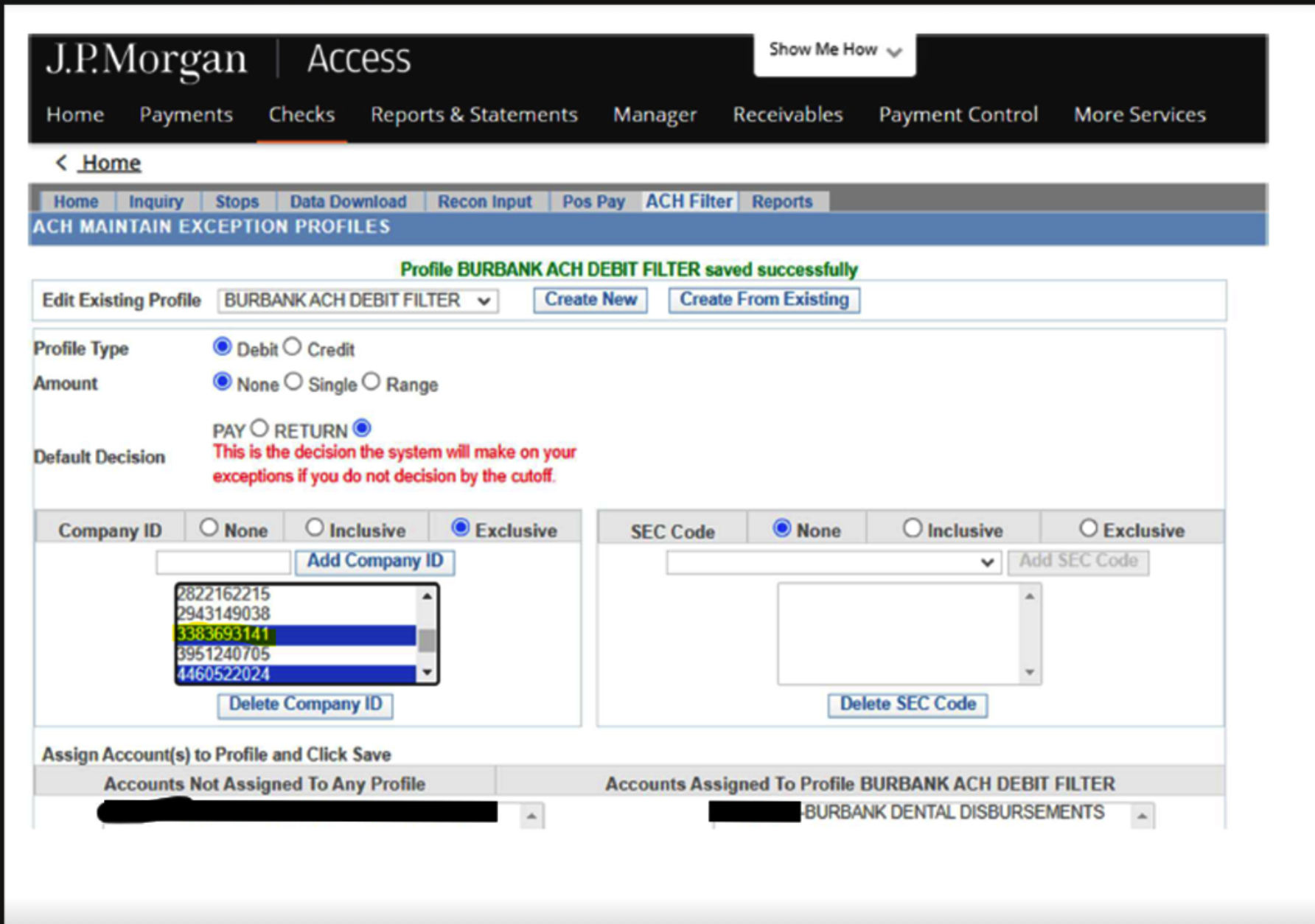
Option 2: Fraud Filter Screenshot
If you use a fraud filter system:
-
Log in to your fraud filter portal
-
Add Company ID 3383693141 to the approved list
-
Take a screenshot showing:
-
Bank name
-
Routing number
-
Account number
-
Confirmation that Company ID 3383693141 has been added
-
Please send the bank letter or screenshot to us once completed.
Here is an example of a screenshot to gather:
What Happens Next?
Once we receive your documentation:
-
We will submit it to the processor to remove the block.
-
Please allow up to 72 hours for the update to fully process through the system.
-
After that, ACH transactions should process normally.
If you have any questions while working with your bank, please don’t hesitate to reach out to our Support Team at support@cdmplus.com. We’re happy to help guide you through this process.